
Headquarters
175 S Main St Suite 1310,
Salt Lake City, UT 84111



A shopper chooses Buy Online Pick-Up In Store (BOPIS) because the product detail page says the item is available nearby. The order goes through, but when a store associate begins preparing it, the item is not on the shelf.
At that point, the problem is no longer a simple stock discrepancy. The retailer must work out what was promised, when the store received the order, whether the customer received an accurate update, and whether another fulfillment option can preserve the purchase.
A failed pickup leaves a trail of operational signals. Following that trail from checkout to rejection helps teams identify the broken handoff instead of treating every cancellation as an inventory problem.
The first question is what the storefront believed was available when the customer placed the order. Pickup availability should reflect the quantity a store can sell online, not every unit recorded at the location.
Suppose a store has five units on hand. Two are protected for local demand, and one is already reserved for another order. The storefront should see two units available for new orders. Pickup eligibility also matters: a product or location may have stock but still be excluded from pickup.
These controls make the promise more conservative, but they cannot prevent every failed pick. An item may be damaged, misplaced, stolen, or waiting for an inventory adjustment. When an associate cannot find it, the useful response is to compare the original availability calculation with the store’s physical finding and investigate the difference.
That distinction matters. One failed pick may point to a local count issue. Repeated failures for the same SKU, store, or time period suggest a pattern in inventory updates, reservations, eligibility rules, or store discipline.
Once checkout is complete, the order must become visible to the selected store with enough time for an associate to prepare it. An order can exist in the eCommerce platform while still waiting to enter the store’s working queue.
Four timestamps make this handoff easier to diagnose: when the order was placed, when it became available to the store, when an associate started working on it, and when it was ready for pickup. The gaps between those events show whether the delay occurred in system processing, store notification, work assignment, or preparation.
Patterns across orders add context. A delay affecting many stores may indicate a shared workflow or notification problem. A delay concentrated in one location, shift, or daypart may point to workload, staffing, ownership, or training. Without those distinctions, teams risk changing technology to solve a store process issue, or asking stores to work around a system delay.
An order confirmation and a ready-for-pickup message serve different purposes. The confirmation says the retailer received the order. The pickup message should go out only after the store has found, picked, packed and made the order ready for handover.
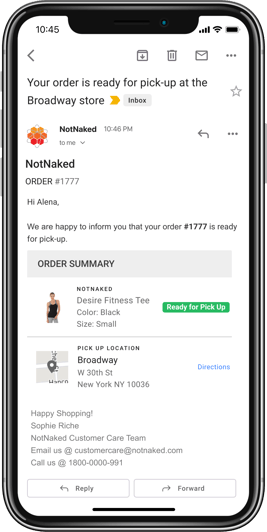
Sending that message too early creates a customer-facing failure even when the inventory was correct. Sending it late creates a different problem: the order is ready, but the customer is still waiting because the communication did not reflect the latest fulfillment event.
To tell those failures apart, compare the time the store marked the order ready with the time the customer notification was triggered and delivered. This shows whether the retailer needs to improve preparation speed or the connection between fulfillment status and customer communication.
The same principle applies when a pick fails. The customer should receive a clear explanation and a usable next step based on the options the retailer can actually fulfill.
A rejected pickup item does not have to become a canceled order. Depending on available inventory and the retailer’s fulfillment model, the customer may be able to collect it from another store, switch to home delivery, continue with the available items, or choose a refund.
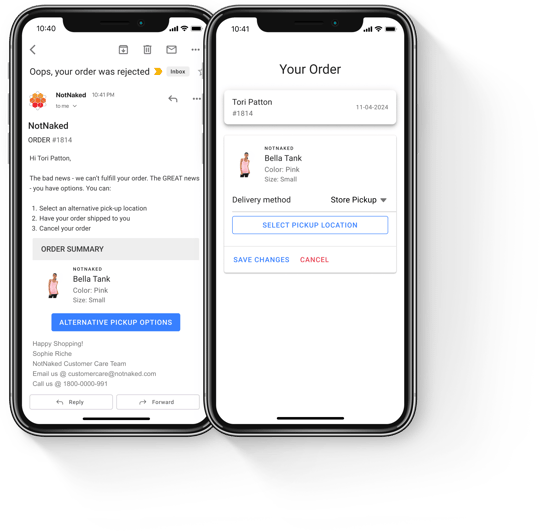
The quality of those alternatives matters as much as their availability. A replacement option that arrives too late, requires a long drive, or forces the customer to restart checkout is unlikely to save the sale.
Recovery should therefore be measured beyond the initial rejection. Track how many rejected items become completed purchases, which alternative customers choose, how long the change takes, and how many orders still end in cancellation. Consistent rejection reasons also help inventory and store teams address the causes that create the most lost demand.
Start with a small sample of recent failed pickup orders and reconstruct what happened at each stage:
What pickup availability did the storefront show when the order was placed, and which inventory rules produced that quantity?
Was inventory reserved when the order was accepted, and did later inventory updates preserve that commitment?
When did the selected store receive the order, and when did an associate begin preparing it?
Which fulfillment event triggered each customer update, and how long did the notification take to reach the customer?
If the item was rejected, what reason was recorded, which alternatives were offered, and what was the final outcome?
Reviewing several orders together is more valuable than debating one anecdote. Segment the results by store, SKU, rejection reason, and time of day. The patterns will show whether the next improvement belongs in availability rules, inventory reconciliation, store execution, communication, or recovery.
HotWax Commerce connects these operational handoffs through a shared order and inventory workflow. Online ATP gives the storefront a sellable store quantity that can account for safety stock, existing reservations, and pickup eligibility before a location is offered to the shopper.
After checkout, the BOPIS Fulfillment App gives store associates a focused queue for incoming pickup orders. Associates can pick and pack the items, mark the order ready for pickup, and record the handover. The ready action can trigger the retailer’s configured customer notification workflow so the message follows the actual fulfillment event.
When an item cannot be picked, retailers can offer another pickup location or home delivery based on available inventory and supported fulfillment options. Partial rejection can keep available items moving while the unavailable item is handled separately.
Customers judge pickup by a simple outcome: whether the order is ready when promised. Delivering that outcome requires each operational handoff to carry accurate information forward.
A failed pickup should lead to more than an apology or a cancellation. It should show the retailer where the order stalled, whether the sale was recovered, and what needs to change before the next customer places the same order.
* * *
Book a demo with the HotWax Commerce team to review where pickup orders stall and how rejected picks turn into avoidable cancellations.





175 S Main St Suite 1310,
Salt Lake City, UT 84111