
Headquarters
175 S Main St Suite 1310,
Salt Lake City, UT 84111



Accurate inventory numbers keep your promises. Inventory cycle counts are small, recurring checks that help retailers maintain accurate stock levels without shutting down stores for full physical inventories.
When counts are off, orders are delayed and customers leave disappointed. To stay on top of inventory between full counts, most retailers rely on cycle counting to catch mistakes early.
For years, many teams have tried to manage these counts with spreadsheets. Familiar as they are, those spreadsheets often become more of a burden than help.
Cycle counts break inventory audits into manageable pieces. Instead of counting every item at once, retailers focus on a subset of SKUs during each count, often prioritising high-value, fast-moving, or high-risk products.
By spreading counts across days or weeks, teams can maintain accurate inventory without disrupting store operations, while still identifying shrinkage, mis-picks, and process gaps early.
Spreadsheets work when the task is small and contained. If you’re counting a single shelf on your own, it’s easy enough to create a table, list a few SKUs, and record quantities as you count or scan items. The challenge starts when cycle counts grow beyond that simple scenario.
As soon as multiple associates are involved, or counts stretch across several days or stores, spreadsheets become difficult to manage. Large volumes of data pile up quickly, spread across tabs, rows and columns that aren’t always easy to interpret.
To make spreadsheets more functional, teams often add formulas for error checks, reminders, or basic progress tracking. Over time, these workarounds make the file more complex and harder to maintain.
Add in version control issues (the dreaded “final_final_v2.xlsx”) and it’s hard to trust any one file. Instead of helping you count, your spreadsheet starts to feel like one more thing to manage.
Inventory cycle counts sound simple: count a portion of your inventory today so you don’t have to count everything at once later. In practice, they can be messy. Items aren’t always where you expect them to be; they may be on a fitting room rack or mis‑shelved in another department. Associates sometimes count the wrong SKU or the wrong location, especially when they’re rushed. Manual data entry leaves room for typos.
Damaged or obsolete stock can be overlooked. When you’re using a spreadsheet, there’s no obvious way to flag these exceptions. Teams end up adding notes in margins or submitting separate type forms to explain why they couldn’t find an item or why the count doesn’t match. Without a clear process for handling mistakes, small errors snowball into bigger variances.
A dedicated Cycle Count App replaces ad‑hoc processes with a clear, guided workflow. It helps you plan, execute and review counts in one place, no more spreadsheets, no more guesswork. The best tools weave together planning, scanning and reviewing so teams spend less time wrestling with documents and more time getting inventory right.
Instead of emailing spreadsheets back and forth, inventory teams create counts centrally and assign them to specific stores or departments. This can be as targeted as checking a handful of SKUs or as broad as auditing an entire store.
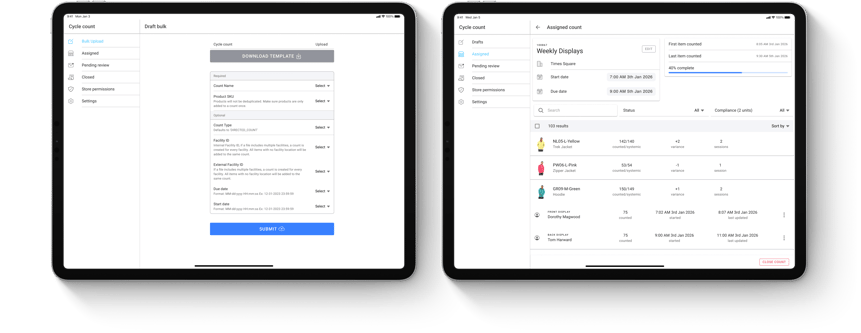
Modern apps let you upload a CSV and distribute hundreds of items across dozens of locations in minutes. Once counts are assigned, progress stays visible in a unified dashboard across all locations.
Before anything begins, managers can review what’s assigned to their store, each count shows the scope, start time and due date so they can align labour and timing.
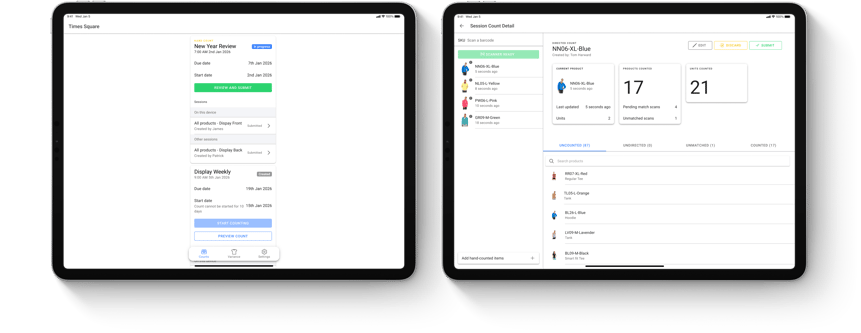
On counting day, associates don’t need to juggle clipboards. They scan barcodes with a handheld device or tablet, and each scan updates the tally instantly. Automatic data capture reduces typos and mis‑keyed quantities.
Large counts can be split by zone, department or shift so multiple associates can work at the same time, and every session records its own timestamps and audit trail.
As items are scanned, the app automatically categorises them, counted items are logged, barcodes that don’t match any product are flagged for later so that they can be matched and undirected scans that don’t belong to the count are highlighted so that they can be removed. The app also lets you add handcounted quantities for items without barcodes.
Associates always see what’s complete and what remains. At the end of the session, they can mark any uncounted items as out of stock and resolve exceptions before handing the results back.
Once the store submits a count, head office reviews the results.
Variances are highlighted and a compliance threshold slider helps reviewers quickly separate small inventory discrepancies from those that need action.
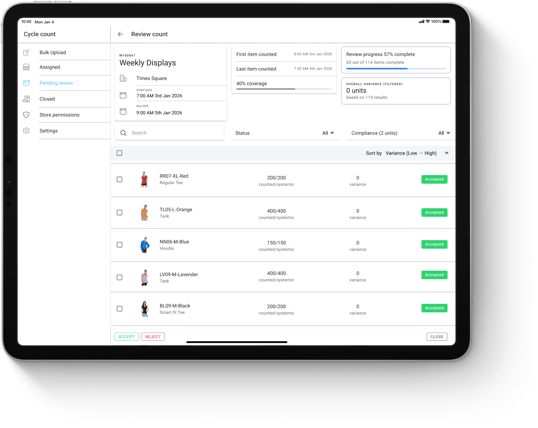
Based on that threshold, the app can suggest if each difference should be accepted or rejected, but operations teams remain in control, adjustments can be approved one by one or in bulk.
Only after this review do inventory updates feed back into eCommerce and ERP systems. Completed counts remain accessible with session histories, variance summaries and decision records for future audits.
Accurate cycle counts are foundational for omnichannel inventory, where stock must stay in sync across stores and eCommerce.
Spreadsheets will always have a place in business, but for inventory counts they’re no longer the best tool. Manual entry, limited automation and poor collaboration make them a bad fit for the pace of modern retail.
A Cycle Count App gives you a clear plan, real‑time execution and a systematic review, everything you need in one place. By planning counts centrally, scanning items in the store and reviewing variances before updating your eCommerce and ERP, you build trustworthy inventory across every channel.
The payoff is fewer surprises, smoother operations and happier customers.
* * *
HotWax Commerce’s Cycle Count App embodies this approach with a native integration into Shopify POS and features like multi‑session counting, real‑time progress and compliance‑threshold review. Adopting a purpose‑built tool like this lets you finally close all those tabs named “inventory_count_final_final.xlsx.”
Book a demo to see how accurate inventory cycle counts drive reliable omnichannel operations with HotWax Commerce’s Cycle Count App.






175 S Main St Suite 1310,
Salt Lake City, UT 84111