HotWax Commerce takes every Shopify order from checkout to the shopper’s door or the pickup counter, and writes each step back into Shopify, from tracking to cancellations.
Shoppers and your Shopify team keep working the way they do today. HotWax takes over what happens after the order.
Checkout, the catalog, customers and payments stay in Shopify. Nothing about how you sell online has to change.
Sellable stock, routing, fulfillment, pickup and returns run in HotWax, and every result goes back to the Shopify order.
Store teams pick, pack, hand over pickups, receive and count in HotWax screens that open inside Shopify POS. Teams that prefer Shopify POS’s own screens can work there instead, and HotWax still routes every order to them.
Shopify tells HotWax about each order and each change to it. HotWax answers in Shopify’s own records, so your Shopify admin and your shoppers always see where the order is.
Shoppers see a delivery date at checkout, worked out from your own routing rules.
Each new order and every edit comes from Shopify by webhook, in real time.
HotWax reads Shopify’s fraud analysis and holds risky orders for your review.
Your routing rules choose the store or warehouse, and Shopify is updated to match.
Tracking or pickup status goes to Shopify, which sends the shopper its usual email.
Shoppers buy whatever Shopify says is in stock. When that number is wrong, orders get cancelled and shoppers don’t come back.
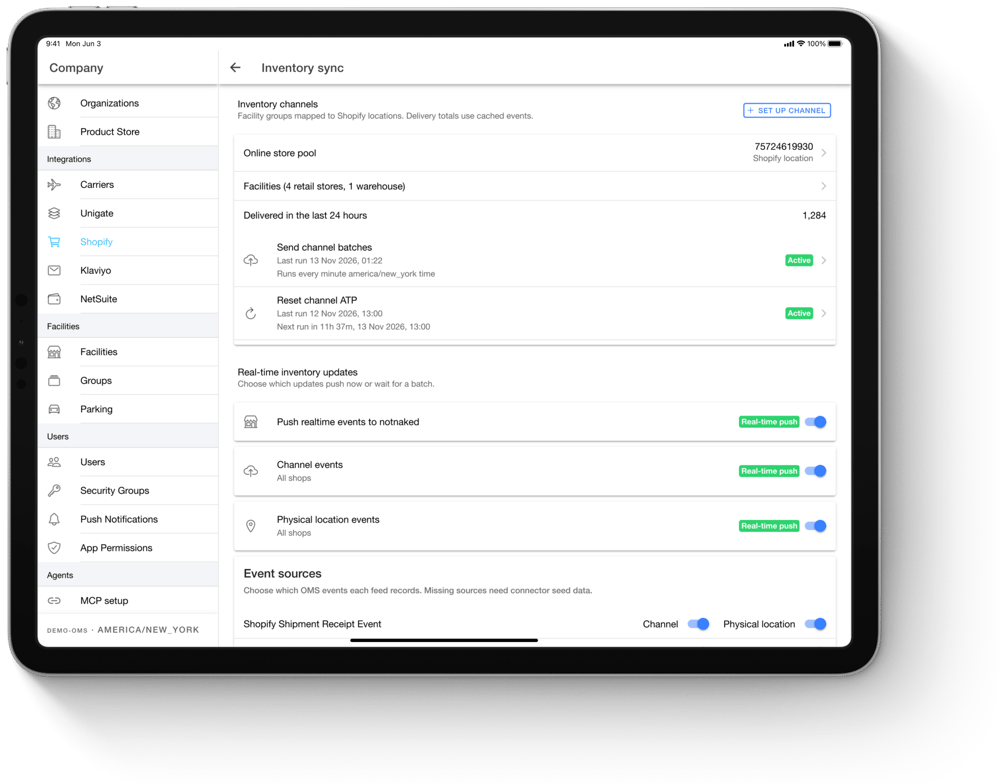
HotWax works out what each location can really sell, after reservations, safety stock and orders already promised. Every change goes to Shopify in real time. Each store can have its own Shopify location, or you can pool warehouses or stores into one, and scheduled full counts keep both sides aligned.
Passing a clean order is easy. The support tickets come from everything that happens after checkout.
Items added or removed, quantities, addresses and tags edited in Shopify update the same order in HotWax. Only the change is applied.
One Shopify order can mix pickup and shipping, or different shipping speeds. Each item keeps the store or shipping method the shopper picked.
When a store can’t fill an order, HotWax routes it elsewhere and moves the Shopify fulfillment order to match. If an item is missing, that store’s stock in Shopify goes down too.
Items or orders cancelled in HotWax are cancelled in Shopify too, with or without a refund, as you choose.
Pre-order and back-order items show promise dates in Shopify, and their fulfillment waits until the stock arrives.
Counter sales come into HotWax as completed sales and reduce that store’s stock.
Returns start wherever the shopper is, online or at the counter. Each one reaches HotWax with the original order attached, so stock and your ERP stay right.
A return requested in Shopify reaches HotWax while it is still open, ready for the store or warehouse to receive.
Returns taken in Shopify POS come into HotWax against the original order.
A POS exchange becomes its own order, linked to the return, so your ERP gets one clean record of each.
Refunds and appeasements made in Shopify are recorded on the HotWax order.
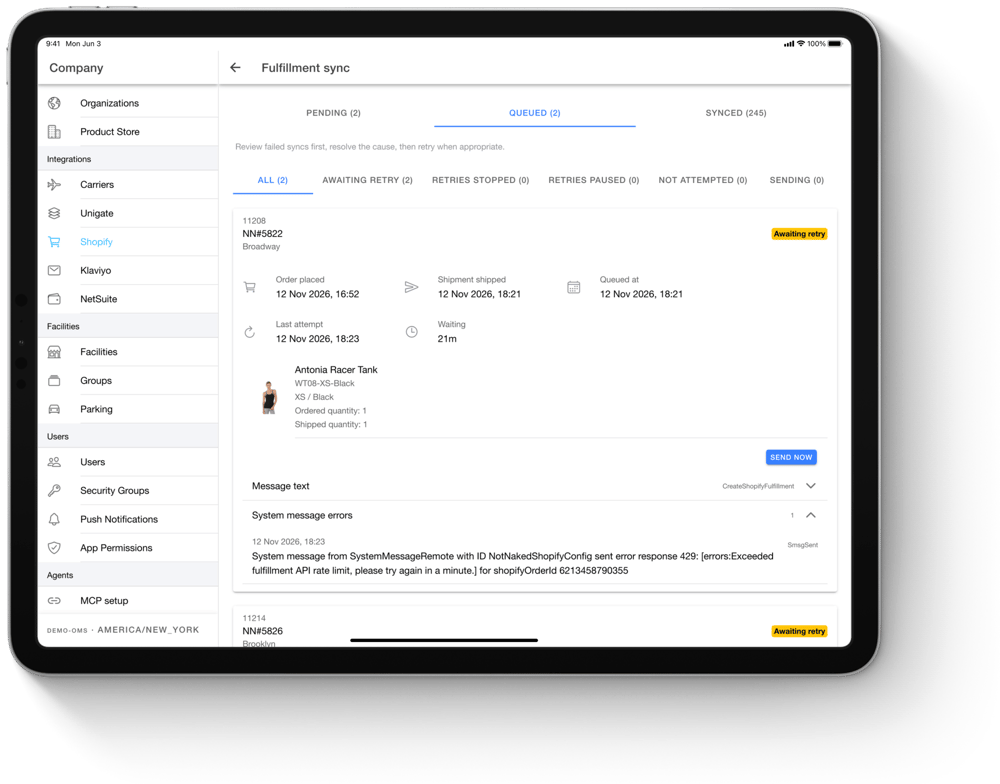
Every integration hits errors, like a Shopify rate limit or a product that isn’t mapped yet. What matters is that your team finds out before a shopper does.
Every product run, stock update, order import and shipment is logged. If Shopify turns something down, your team sees which record, the reason in plain words, and can send it again once it’s fixed.
Every Shopify setup is a little different. These are settings your team picks, not code to write.
Connect several Shopify stores to one HotWax, with a shared catalog or a separate one for each.
Map each store or warehouse to its own Shopify location, or pool several into one.
Send different stock to different stores, for example domestic and international, from the same locations.
Products, variants, barcodes, images, prices, tags and the metafields you choose sync from Shopify.
Every transfer approved in HotWax also appears in Shopify. Stores can ship and receive it in HotWax or in Shopify POS, and both stay updated.
Use the fraud app you already have. HotWax reads Shopify’s fraud analysis and your app’s order tags.
Using NetSuite too? HotWax connects to it as well. Orders and stores run in HotWax, and accounting stays in NetSuite.
Most retailers go live in 3 to 6 weeks.
HotWax connects through its own app on the Shopify App Store, with no third-party connector in between. It uses Shopify’s GraphQL Admin API, bulk operations for large catalogs, and webhooks, so each new order and edit reaches HotWax in real time.
Through the HotWax app on the Shopify App Store. It uses Shopify’s GraphQL Admin API, bulk operations and webhooks, with no third-party connector in between.
In real time. Shopify sends a webhook for each new order and every edit as it happens, and a check every five minutes catches anything Shopify didn’t deliver.
Every stock change is sent to Shopify in real time. Scheduled full counts also run to keep both sides aligned.
Yes, in two ways. Store teams can use HotWax Fulfillment, BOPIS, Receiving and Cycle Count inside Shopify POS, or stay on Shopify POS’s own screens: the Shipping and Pickup lists, Shopify transfers, and count screens HotWax built for POS. HotWax screens open already signed in to that store and scan with the POS device. Either way, POS sales, returns and exchanges come into HotWax, and HotWax routes every order and keeps stock in sync.
Yes. Several Shopify stores can share one HotWax, with one catalog or a separate catalog for each.
It’s logged with the reason. Your team sees which product, order or stock update failed and can send it again once it’s fixed.
No. The integration works with any Shopify plan that supports apps. Shopify Plus adds things like expansion stores, which HotWax also supports.
Yes. Shopify keeps selling, HotWax runs orders and stores, and NetSuite keeps the books. See the NetSuite integration.