
Headquarters
175 S Main St Suite 1310,
Salt Lake City, UT 84111



Inventory accuracy depends on one simple question: did the store record what actually arrived?
A shipment reaches the store and inventory is updated based on what is received. If the recorded quantity does not match what is physically there, the inventory is already incorrect. Everything that follows, from availability to fulfillment, relies on that initial record.
This is why many inventory issues are not created during the day. They exist from the time the shipment is received.
In omnichannel retail, the impact is immediate. Inventory recorded at the store becomes available across channels through the Order Management System. If the data is wrong, customers see availability that does not match reality, and store teams spend time dealing with the consequences.
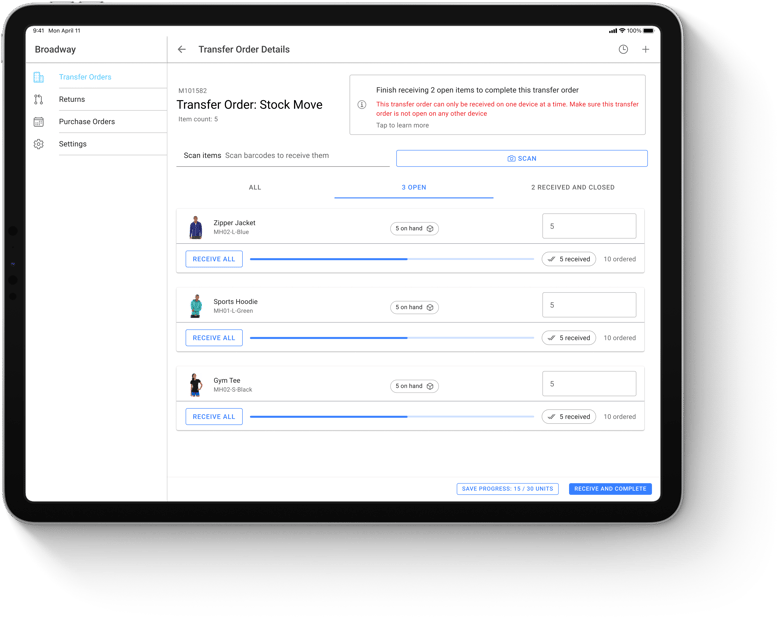
Stores do not receive all inventory the same way. In most cases, purchase orders (POs) arrive at DCs and are then broken down into transfer orders for each store. The warehouse sends the right quantities for each SKU, and the store receives this as a transfer. In other cases, vendors ship purchase orders directly to the store and the store team must check those items in against the original PO.
From the perspective of store associates these flows look similar: shipments arrive, items are unpacked and quantities are recorded. The inventory receiving process seems straightforward, match what arrived with what was expected and update inventory, but receiving rarely happens in isolation.
Shipments arrive during store hours, and associates are also helping customers, replenishing shelves and sometimes picking online orders. Receiving is squeezed in between other responsibilities.
A receiving session starts with an associate opening boxes and checking items against a list on a screen or a printed manifest. When everything matches, the process is quick: the quantities are recorded and the shipment is closed. When something does not match, the flow stalls.
The most common shortcut is Receive All. Instead of verifying every SKU, the associate marks the entire shipment as received. It saves time, especially when the delivery looks correct.
Performing the receive all action by order records what was expected, not what actually arrived. If the shipment is short, those missing units are now counted as available. If some items are damaged or misplaced, they still appear in the system as ready to sell.
Another everyday scenario involves mis‑shipped or extra items. A product shows up that is not part of the purchase order or transfer. Without a simple way to add it during receiving, the item is set aside. That item is physically in the store but invisible in inventory.
None of these decisions feel dramatic in the moment. They are small choices made to keep things moving. Each one creates a mismatch between physical stock and recorded inventory.
In a store‑only environment, receiving mistakes stay local, they affect that store’s shelves but do not ripple outward. In omnichannel retail, inventory is shared across channels. As soon as stock is received, the Order Management System makes it available for online orders, BOPIS and Ship from Store.
If the recorded number is wrong, the impact is immediate. An item that never arrived can be sold online and allocated to a customer order. An item sitting in the backroom but not recorded never appears for sale. Store teams spend time looking for products that are not there and rejecting orders that cannot be fulfilled. All of this traces back to what was recorded at receiving.
Many retailers rely on cycle counting to keep inventory accurate. Cycle counting identifies discrepancies, but it does not prevent them. By the time a mismatch is discovered, the shipment has been unpacked and items have moved. Associates no longer remember what happened at receiving. Adjustments are made based on assumptions.
Spreadsheets or ERP screens make this worse. They require manual entry and often do not allow associates to record exceptions. Without a dedicated receiving workflow, inventory discrepancies become normal. Stores keep operating while carrying hidden shortages and overages.
An ideal receiving process focuses on recording what actually arrives while allowing associates to work quickly. It should not force a choice between speed and accuracy.
Scan every item instead of relying on manual counts. Scanning verifies each unit and eliminates typos.
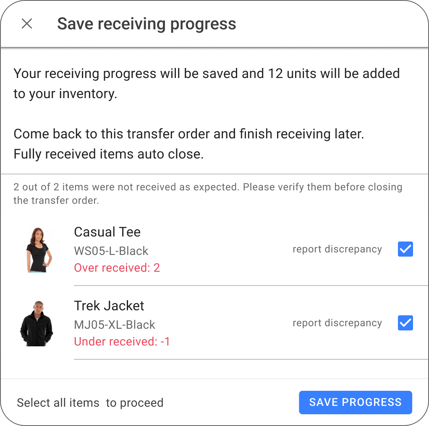
Make it easy to capture exceptions. If an unexpected item arrives, associates should be able to add it to the transfer at the time of receipt instead of setting it aside. Missing or damaged units should be recorded immediately.
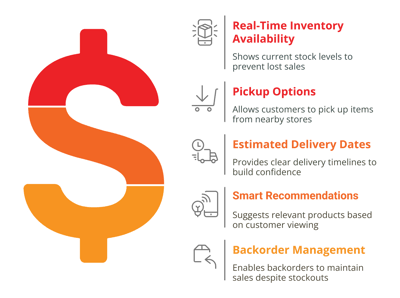
When stores record what actually arrives, inventory becomes reliable and the numbers start to work in a retailer’s favour. In most operations, manual receiving delivers only about 65-75% inventory accuracy. Moving to a scan‑based, exception‑friendly process routinely lifts accuracy above 95%. That jump has knock‑on effects across the business:
Getting inventory right at receiving means the rest of the operation can trust the numbers. In omnichannel retail, where every unit can be sold anywhere, that trust is non-negotiable.
HotWax Commerce provides a store inventory management suite designed for this reality. Instead of relying on spreadsheets or ERP screens, store teams use an iPad‑first interface with clear product images and mandatory scanning. They can see current inventory while receiving, split large transfers across multiple associates and capture shortages, overages and mis‑picks in real time. When the transfer is done, HotWax Commerce updates inventory counts across the Order Management System, ERP and eCommerce channels so there are no blind spots. The entire workflow is designed for store associates, so they do not need to learn a complex ERP to receive stock.
Ready to see it in action? Schedule a demo today and take the first step toward inventory you can trust!
* * *
HotWax Commerce OMS helps retailers improve inventory accuracy with scan-based receiving and real-time inventory updates across stores and channels.
Book a demo to see how accurate receiving supports more reliable omnichannel fulfillment.
Shopify’s native tool, Stocky, covers general inventory management, but it’s being phased out.
For store receiving, most retailers benefit from a more specialized app, one that supports scan-based verification and real-time exception handling.
HotWax Commerce offers a POS-embedded receiving app designed for devices like iPads. Store associates can scan each item, view product images instantly, flag discrepancies on the spot and even split the receiving workflow across multiple team members.
Once receiving is complete, inventory updates sync automatically across your OMS, ERP, and eCommerce channels, so every system reflects the same, accurate stock levels.
Most retailers can configure and launch within a week. The key steps are installing the app, connecting it to your OMS/ERP, testing and training associates.
Modern POS receiving apps are designed to be intuitive.
Associates mainly need to know how to scan items, log discrepancies and complete the receiving process. A short hands-on session, supported by documentation, is usually enough to get teams comfortable and productive.
A good receiving workflow allows associates to record these items directly during the process.
If extra units of an expected SKU arrive, associates can scan them and record an over-receipt. The app updates the received quantity beyond what was expected and flags the variance, which is then shared with the ERP for reconciliation.
If a completely unexpected item shows up (not part of the transfer or PO), associates can add it to the receiving session, enter or confirm the SKU and record the quantity. That item is immediately added to store inventory.
Once receiving is completed, all updates, including overages and newly added items, are synced across OMS, ERP, and eCommerce systems so inventory stays consistent everywhere.
Start by looking at variance reports, transfer discrepancies and exception logs. These help you identify recurring issues, like consistent mis-picks from a specific warehouse and take corrective action.
Beyond that, retailers commonly track:
Monitoring these KPIs helps you measure the impact of accurate receiving and spot opportunities for process improvements or additional training.
Many platforms, including HotWax Commerce OMS, provide real-time dashboards and exportable reports, making it easy to compare performance across locations and share insights with vendors or distribution centers.






175 S Main St Suite 1310,
Salt Lake City, UT 84111