Store inventory management is the daily work of receiving, counting, protecting, moving, restocking, and taking back stock in each store, so the count in the system matches what is on the shelf. Once a retailer sells store stock online, that count stops being a back-office number. Every pickup order, ship from store order, and "in stock near you" message on a product page is a promise made against it.
When the count is wrong, it can be wrong in either direction. Units the system thinks are there get promised to online shoppers, and the store has to reject the order. Units that are on the shelf but missing from the system are never offered online at all, and they sit until they are marked down.
This guide follows stock through a store one step at a time. For each step, it covers where things tend to go wrong, what good practice looks like, and the number worth tracking. It is written for the people who run store and inventory operations across many locations.
A store used to serve one kind of customer, the person who walked in. If the count drifted by a few units, the store found out at the next stocktake and adjusted. Now the same shelf also serves online orders through buy online pick up in store (BOPIS) and ship from store. A drift of a few units now shows up as a rejected order, a canceled sale, or a customer who drove to the store for an item that wasn't there.
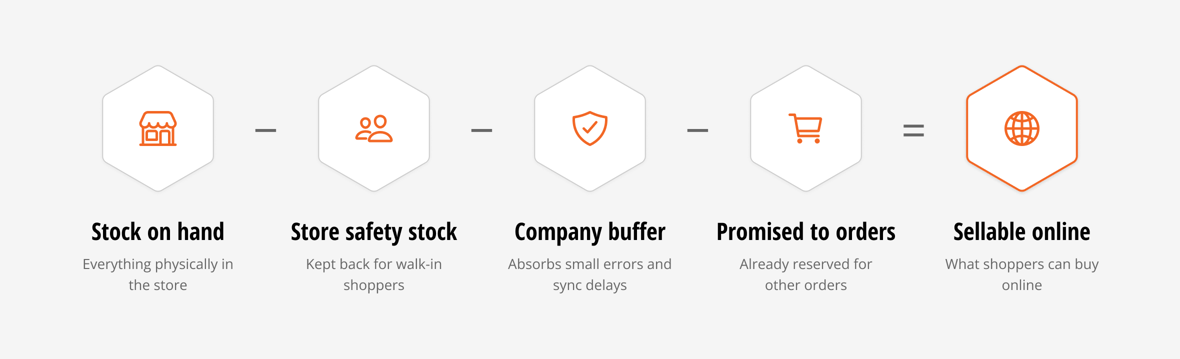
That change makes one distinction worth keeping clear. Stock on hand is what is physically in the store. Stock you can sell online is smaller: it is stock on hand, minus a buffer the store keeps for walk-in shoppers, minus any company-wide buffer set to absorb small errors, minus units already promised to other orders.

Most of store inventory management is about making the first number accurate, so the second number can be trusted and the buffers can stay small.

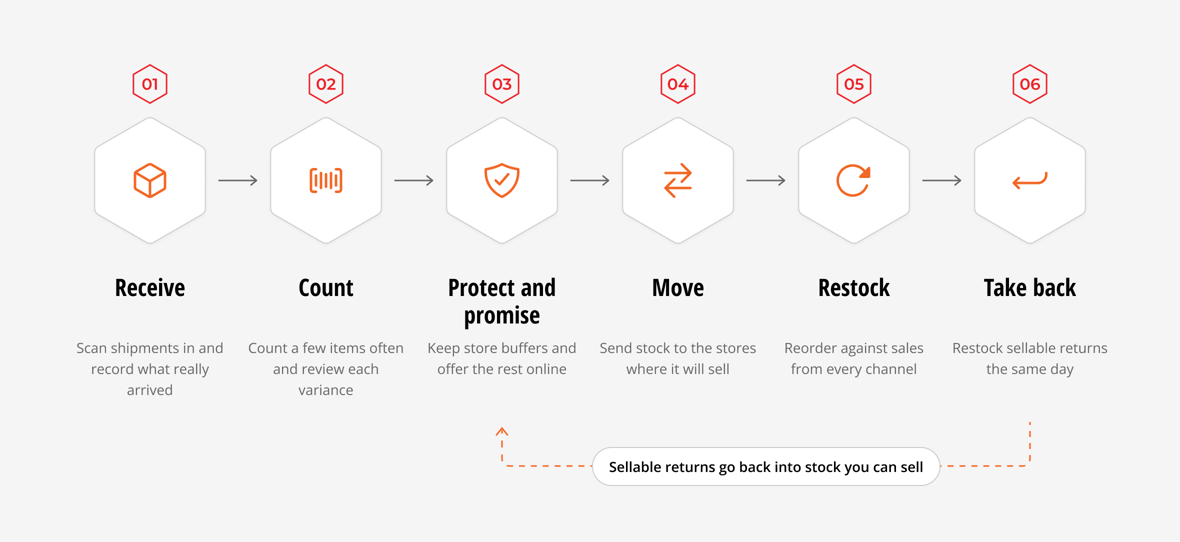
Stock moves through a store in six steps:
An error at any step stays in the count until someone finds it, and every promise made in the meantime rests on it. That is why accuracy has to be protected at each one, rather than corrected once a year in a full count.
Stores take in two kinds of shipments. Transfer orders come from a warehouse or another store. Purchase orders are shipped by a vendor straight to the store, which is common for retailers without a large distribution center network.
The usual mistake is receiving to the paperwork instead of the box. A store expects 100 units, the carton holds 90, and the associate accepts the shipment as complete because the packing slip says 100. The system now holds 10 units that don't exist, and the next online orders for that item can be promised against them. The opposite also happens. A shipment sits in the back room for two days before anyone records it, so stock that is physically in the store can't be sold online.
Good inventory receiving starts with scanning items against the expected shipment while unpacking, so the quantity recorded is the quantity counted. Over-receipts and short receipts are flagged before the receipt is closed, while the box is still there to check. The receipt is recorded the day the shipment arrives, so stock moves from the back room to "available to sell" in hours, not days.
The number to watch: The share of receipts closed with a discrepancy, by store and by supplier. A store that almost never reports one may simply not be checking.
Go deeper with inventory receiving: where store inventory accuracy is decided.
Even with careful receiving, counts drift. Items get damaged, misplaced, or stolen, and the wrong size gets scanned at the register. A full stocktake once or twice a year catches all of it at once, but by then the errors have spent months turning into rejected orders and missed sales.
Cycle counting spreads the work out. Instead of counting everything on one day, a store counts a small set of items often. Fast sellers, high-value items, and items that keep showing errors get counted more often than the rest, and the count becomes part of the weekly routine instead of a closed-store event.
The step that makes cycle counts trustworthy is review. When a count differs from the system, that difference is called a variance. It should be checked and given a reason, such as damaged, not found, or received wrong, before it changes the stock record. Without a review step, head office is often reluctant to let stores count at all. With one, stores do the counting and head office keeps control of the record. Associates need a simple counting screen, while reviewers need a wider view of variances across every store.
The number to watch: Inventory accuracy by store, meaning the share of counted items where the system matched the shelf, and variance by reason. Reasons show which process to fix, which a single unexplained gap never does.
Our guide to retail cycle counts covers how often to count and how to choose what to count.
This is the step where store inventory becomes online inventory, and it is where errors from every other step reach the shopper.
If every unit in a store is offered online, the last unit on the shelf can sell twice: once to a walk-in shopper and once to an online order the store then has to reject. Retailers handle this by keeping a buffer at each store, usually called safety stock, that is never offered online. A company-wide buffer, sometimes called a threshold, sits on top to absorb small errors and timing gaps between systems.
Buffers work, but their cost is easy to miss. When counts aren't trusted, buffers get padded "just to be safe," store by store. Every padded unit is a unit online shoppers never see, even though it is sitting on a shelf. That stock ages and often ends up marked down. Accurate counts are what let a retailer keep buffers small and offer more of its store stock online at full price.
Good practice sets the store buffer by store and by type of product, keeps the company buffer small, and revisits both as counts get more accurate. The quantity offered online should always come from a rule anyone on the team can explain.
The number to watch: The store rejection rate on online orders, meaning orders a store couldn't fill after they were assigned to it, and the share of store stock offered online.
Stock doesn't always sell where it lands. A warehouse tops up a busy store before the weekend, or a store heavy on denim sends jeans to a store where they are selling faster. Transfers also rescue online orders: when a pickup store doesn't have an item, it can be sent from a store or warehouse that does.
Inventory transfers agreed over the phone or by email are a common source of stock that disappears. The sending store takes the units out of its count, the receiving store doesn't record them for days, and in between the units exist in neither count. If the sending store forgets to remove them, they exist in both.
The fix is to treat every move as a transfer order with two recorded steps, shipped by the sending location and received by the receiving one. Differences on arrival, such as short, extra, or wrong items, are flagged against the transfer so someone can resolve them while the details are fresh. Stock on the way stays visible as in transit, so planners don't reorder what is already on a truck.
The number to watch: The time from ship to receive, and units that stay in transit longer than your normal delivery window.
Restocking, often called retail replenishment, decides how much new stock each store gets and when. Many retailers set a reorder point for each item at each store, which is the level that triggers a top-up. They pair it with a maximum stock level and a standard reorder quantity.
Reorder points tend to be set once, at store opening or the start of a season, and rarely revisited. Online demand makes this worse. When a store fills ship from store and pickup orders, those sales draw down its stock just like walk-in sales, yet a plan built only on register sales won't see them. The store keeps running out of the items online shoppers want most.
Review reorder points against recent sales split by channel: sold in the store, sold in the store and shipped to the customer, and sold online and filled from the store. Also count stock that is already on the way, including open purchase orders, transfers, and expected returns, before ordering more.
The number to watch: The stockout rate on your top sellers by store, and sell-through by store.
For more ideas, read 7 inventory optimization strategies to sell more without stocking more.
Many shoppers return online orders to their nearest store. Each return needs a decision: does the item go back into sellable stock, or is it damaged and set aside?
Returns often land in a bag in the back room, waiting for someone to deal with them. Until then the item isn't in the count, so it can't be sold online, and the same product may be selling at full price elsewhere in the network while this unit waits. By the time the return is processed, the season may be close to markdown.
Stores that get this right handle returns in the same tool associates use for receiving. They record the item's condition and the return reason, and put sellable items back into the count the same day.
The number to watch: The time from return to sellable stock, and the share of returns marked damaged by store.
Read about the benefits of buy online, return in store and six scenarios for online and in-store returns.
Store updates only help once they reach the systems that use them. If the ERP doesn't get the receipt, the count correction, or the transfer, planners and finance work from the wrong numbers. If the storefront doesn't get them, shoppers see stock that isn't there or miss stock that is.
This is where many retailers find their real gap. The store does the work, yet the result lands in one system and not the others, or arrives hours later. Good store inventory management treats the store, the order management system, the ERP, and the storefront as one inventory record. Each change is recorded once and passed to every system that needs it.
Each step above has one number worth tracking, and together these inventory management KPIs give a weekly picture of store inventory health. Compare stores with each other and watch each store's trend instead of chasing an industry benchmark. The stores at the bottom of the list show you where to start.
| Step | Number to track | What it tells you | Healthy direction |
|---|---|---|---|
| Receive | Share of receipts closed with a discrepancy | Whether stores check shipments, and which suppliers ship short | Low, but rarely zero |
| Count | Inventory accuracy by store, and variance by reason | How far counts drift, and which process causes it | Up |
| Protect and promise | Store rejection rate on online orders | How often online promises fail at the store | Down |
| Protect and promise | Share of store stock offered online | How much sellable stock the buffers are hiding | Up |
| Move | Time from ship to receive, and units in transit too long | Whether stock is going missing between locations | Down |
| Restock | Stockout rate on top sellers, and sell-through by store | Whether replenishment keeps up with every channel | Stockouts down, sell-through up |
| Take back | Time from return to sellable stock | How long returned items sit outside the count | Down |
For more on these measures, read critical KPIs to improve your retail store inventory management.
With a handful of stores, a strong store manager and a spreadsheet can keep counts close. As the network grows, each store's decisions start to affect the others. A transfer one store forgets to record changes what another store can sell, and a buffer padded at one location hides stock the whole network could have sold online. Head office can no longer check each store by phone.
Two things tend to break first. The tools stores use were often built for head office. Associates end up receiving, counting, and transferring stock through ERP screens designed for planners and accountants, which is slow and easy to get wrong. The record itself breaks too, because when each store keeps its own version, nobody can see the network as a whole.
Multi-location inventory management works when associates get simple, scan-first tools for their daily tasks. Head office, in turn, gets one record of every store's stock, with a review step on the changes that matter.
HotWax Commerce is an omnichannel order management system for retailers that sell through Shopify and their own stores, often with NetSuite as their ERP. It gives store teams scan-first apps for receiving, counting, and transfers, and gives head office the rules and planning screens for the other steps. All of it runs on one record of what every store can sell.
NetSuite stays the system of record for inventory. HotWax runs the store work and sends receipts and approved adjustments back to NetSuite as the matching records.
Gorjana grew from about 20 to more than 90 stores while running on HotWax. KREWE's Director of IT, Jeff Jones, pointed to HotWax's "robust out of the box integration with NetSuite and Shopify."
See how it works on our store inventory management solution page.
Store inventory management rarely gets attention until an online order fails. Retailers that protect the count at every step, from the receiving door to the returns bag, can offer more of their store stock online and keep the promises they make on it.
Talk to our team about your store inventory.
![]()