
Headquarters
175 S Main St Suite 1310,
Salt Lake City, UT 84111



The product page shows sold out while the same item sits on a store shelf. Operations teams often treat that mismatch as a data problem and start looking for the sync that failed. Sometimes the stock count is stale or wrong. But sometimes nothing has broken.
The storefront still shows zero because the stock on the shelf is not the same as the inventory available for an online order. Reservations, safety stock, company-level thresholds, pending orders, and location eligibility all affect the number published to the storefront.
Without that context, an accurate number can look broken. Teams escalate the issue, check counts manually, and eventually override a safeguard without knowing why it was applied. The number changes, but the underlying risk remains.
Inventory has three useful layers. Quantity on hand (QOH) is the physical stock at a store or warehouse. Available to promise (ATP) subtracts inventory already reserved for orders. Online ATP goes further by accounting for the rules that decide what should be sold through a particular channel.
Those rules may hold back units as safety stock for walk-in shoppers, apply a company-level threshold, remove inventory promised to orders awaiting allocation, or exclude locations that do not participate in online selling. The result is a sellable quantity, not a raw stock count.
The math is straightforward. Reading one result is harder. A customer service representative sees zero on the product page. A store associate sees units on the shelf. A merchandiser sees demand but cannot tell whether the product is unavailable because of a reservation, a buffer, or a location rule.
The business cost of inventory distortion is significant. A 2023 IHL estimate put the global impact of overstocks and out-of-stocks at $1.77 trillion. Industry totals become real at the product level: a shopper sees sold out and leaves while stock that might have filled the order remains unavailable online.
Real-time inventory updates solve latency. They move changes between systems faster, which matters when stores, warehouses, and eCommerce share inventory. But speed answers when a number changed, not why it has a particular value.
That distinction matters during an escalation. If teams cannot identify the input or rule behind a zero, they may reduce safety stock or turn on Shopify's “Continue selling when out of stock” setting. The storefront accepts orders again, but it may now sell inventory reserved for open orders or protected for store demand.
The result can be cancellations, refunds, avoidable split shipments, and more manual work. A faster number is valuable. A number with a visible reason is safer to act on.
Inventory explainability does not require every user to understand the full calculation. It requires the system to expose enough context for a team to diagnose the result before changing it.
A useful explanation should answer four questions:
What changed the physical or available quantity?
Which orders already hold inventory?
Which buffers reduce the sellable quantity?
Which locations or channels are excluded?
These answers come from two related views. The first is inventory history: the events that changed QOH or ATP, such as a sales reservation, shipment, transfer, ERP adjustment, or rejected pick. The second is the Online ATP calculation: the rules and deductions that convert available stock into the quantity published to eCommerce.
Together, these views separate a bad count from an intentional deduction. That prevents teams from treating every unexpected zero as the same problem.
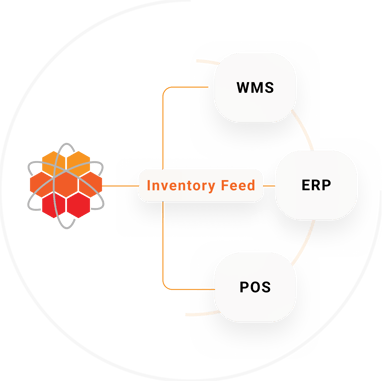
HotWax Commerce connects inventory and order activity across Shopify, ERP, POS, WMS, and store operations, giving teams a clear path from physical stock to the quantity published online.
Instead of presenting Online ATP as an unexplained result, HotWax shows how channel eligibility, brokering settings, safety stock, thresholds, and demand already promised in queues shape the final number. When a channel shows zero, operations teams can identify the deduction responsible before changing a rule or releasing more inventory.
If the problem comes from a stock movement rather than an availability rule, teams can trace changes in ATP and QOH back to the related order, transfer, receipt, cycle count, or manual adjustment. This separates an intentional deduction from an incorrect count.
Teams can also compare the Online ATP calculated by the OMS with the quantity available in Shopify. That makes it easier to determine whether the issue belongs in the inventory calculation or the process that publishes inventory to the storefront.
The result is not just a more accurate number. It is a number the team can investigate, explain, and act on without removing the safeguards that protect store inventory and committed orders.
The immediate benefit is a better support response. Instead of telling a shopper that “the system is wrong,” customer service can identify whether inventory is already reserved, protected for store demand, or unavailable from the selected location.
Operations teams also make safer changes. They can adjust an overly conservative threshold without removing every buffer, investigate a repeated inventory adjustment at one facility, or correct a location's online-selling status. The fix matches the cause.
Merchandisers get a clearer view of missed demand. A zero caused by limited supply calls for replenishment. A zero caused by a large buffer calls for a policy review. A zero caused by an excluded store calls for an eligibility decision. Each problem needs a different response.
Availability and routing are connected decisions. Inventory first determines which locations have sellable stock. Configurable order routing then evaluates eligible locations using rules such as proximity, shipping method, fulfillment capacity, and location priority.
When availability rules are clear, teams can distinguish between a location with no stock and a location intentionally excluded from online fulfillment. That makes routing exceptions easier to diagnose and reduces the temptation to broaden fulfillment rules without understanding the tradeoff.
An accurate stock count and an accurate Online ATP value answer different questions.
Real-time sync explains when inventory changed, not why the published quantity has a particular value.
Inventory history shows the events that changed QOH and ATP, while the Online ATP calculation shows how rules and deductions shape sellable inventory.
Teams make safer changes when they can identify the cause before overriding a buffer or location rule.
* * *
Take one product that recently showed sold out while stock remained in your network. Review its inventory history and Online ATP inputs before changing the published quantity. If your current system cannot show both, book a demo to see how HotWax connects the calculation to the operational record.






175 S Main St Suite 1310,
Salt Lake City, UT 84111