A retail tech stack is the set of systems a retailer uses to sell, take payment, hold stock, fill orders, and keep the books, plus the connections between them. For a retailer with stores and a website, that usually means an eCommerce platform, a point of sale (POS) system, an enterprise resource planning (ERP) system, and, once stores start filling online orders, an order management system (OMS).
The stack decides whether the stock a shopper sees online is really on a shelf, whether an online order lands at a store that can fill it, and whether finance, stores, and eCommerce are working from the same numbers. That matters far more than which screens your teams log into.
This guide is for the CIO, CTO, or head of eCommerce at a multi-store retailer who is deciding what to add, replace, or connect next. You'll find the core systems and the job each one should own, which stack fits which stage of growth, and the signs that a stack has stopped working.
An eCommerce tech stack is built around one website. The storefront sits in the middle, with apps around it for payments, email, reviews, shipping, and support. Most guides to the eCommerce tech stack stop there, and for a brand that only sells online, that is often enough.
A retail tech stack has to do more, because the same stock serves two kinds of customer: the person who walks into a store and the person who orders online. Stock now lives in many places, orders can be filled from many places, and every system involved holds its own version of the truth.
That is why the most useful question about a retail stack is not "which tools do we need?" but "which system owns each job?" Most stack problems start when two systems both think they own the same number, such as two stock counts for the same store, or when nobody owns a decision at all, such as which store should fill an online order. Overselling, orders keyed in by hand, and reports that never agree are usually ownership problems, not tool problems.
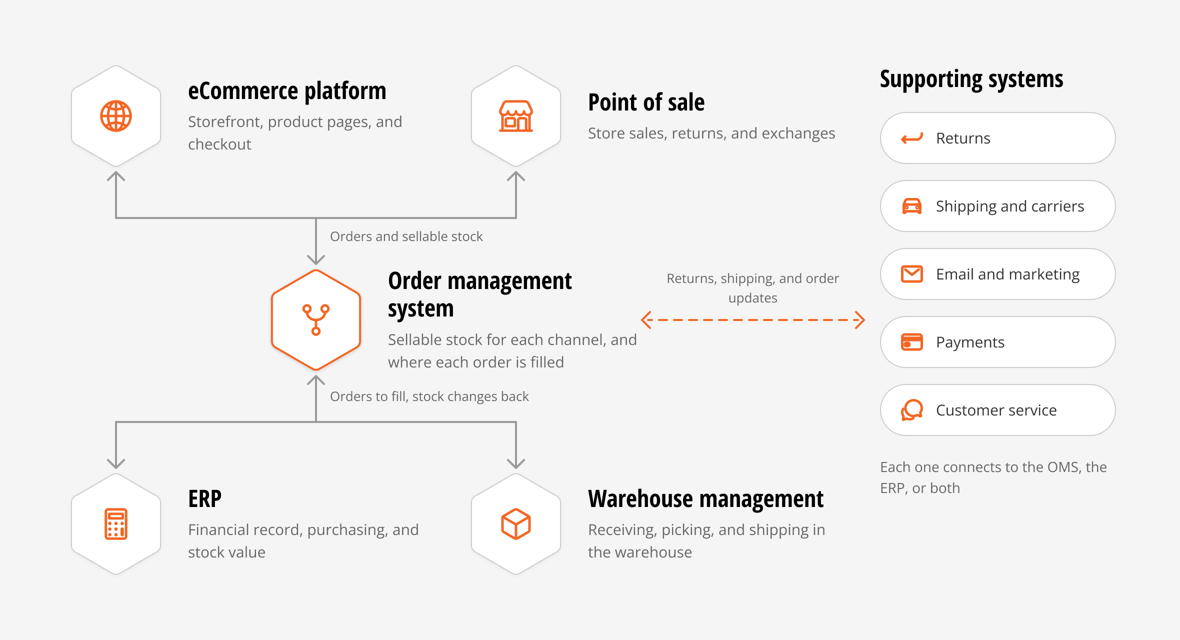
Most multi-store retailers end up with the same five core systems, plus a ring of supporting tools. Here is what each one is for.
eCommerce platform. The storefront: product pages, cart, checkout, and the customer's online account. Shopify is the common choice for brands with stores, because the storefront and the POS run on one platform. The eCommerce platform should own how products are shown and sold online, not how much stock exists or where an order is filled.
Point of sale (POS). The register and the tools store teams use with customers: in-store sales, returns, exchanges, and customer lookups. Retailers on Shopify often run Shopify POS. Larger chains may run Oracle Retail Xstore or another enterprise POS. For a closer look at the trade-offs, read is Shopify POS right for enterprise retailers.
Enterprise resource planning (ERP). The financial record of the business: purchasing, accounting, the value of inventory on the books, and reporting across legal entities. NetSuite is a common choice for mid-market retailers on Shopify. The ERP should stay the system of record for stock value and finance.
Order management system (OMS). The system that decides how much stock each channel can sell and where each order should be filled. An OMS pulls stock from stores, warehouses, and the ERP into one pool, works out what is safe to sell online, and routes each order to a store or warehouse. Once stores fill online orders through buy online, pick up in store (BOPIS) or ship from store, this is the job that needs a clear owner. Our guide to ERP vs OMS explains where the line between the two sits.
Warehouse management system (WMS). What happens inside the warehouse walls: receiving, putaway, picking, packing, and shipping at volume. Some retailers use the warehouse tools inside their ERP, and some use a third-party logistics (3PL) partner's system.
Supporting systems. These sit around the core and connect to it:
Each system type has its own buying questions. Our list of 10 key retail systems for omnichannel retailers goes deeper on each one.
This table is the short version of the whole page. For each kind of data, pick one owner. Other systems can read it or add to it, but only one system decides the number.
| Data | Usual owner | Systems that read it | What goes wrong when two systems own it |
|---|---|---|---|
| Product details | ERP, or a product information system if you have one | eCommerce platform, POS, OMS | Names, sizes, and barcodes drift between channels, and orders fail to match products |
| Price | The ERP or the eCommerce platform, not both | POS, OMS | Stores and the website charge different prices for the same item without meaning to |
| Stock on hand at each location | ERP as the record, updated by the store and warehouse tools where stock moves | OMS, eCommerce platform | Each system reports a different count, and nobody knows which one to fix |
| Stock you can sell online | OMS (the eCommerce platform, if you have no OMS) | eCommerce platform, marketplaces | Overselling, or stock sitting in stores that shoppers never see |
| Stock value | ERP | Finance and planning reports | Inventory on the books doesn't match the business |
| Online orders, from checkout to delivery | OMS once orders are captured, eCommerce platform before that | ERP, customer service, email | Orders get keyed in twice, or stall between systems with no one watching |
| Where each order is filled | OMS | Stores, warehouse, ERP | Stores reject orders, or the warehouse ships what a nearby store could have filled |
| In-store sales | POS | ERP, OMS | Sales count twice, or store stock never goes down |
| Returns | Returns platform or OMS for status, ERP for the refund value | POS, eCommerce platform | Returned items sit outside the count, and refunds don't match returns |
| Financial record | ERP | Every reporting tool | Revenue and margin differ by report |
Two rows matter most for a retailer whose stores sell online: stock you can sell online, and where each order is filled. Neither the eCommerce platform nor the ERP was built to make those calls across many stores. Those two rows are usually the reason a growing retailer adds an OMS.
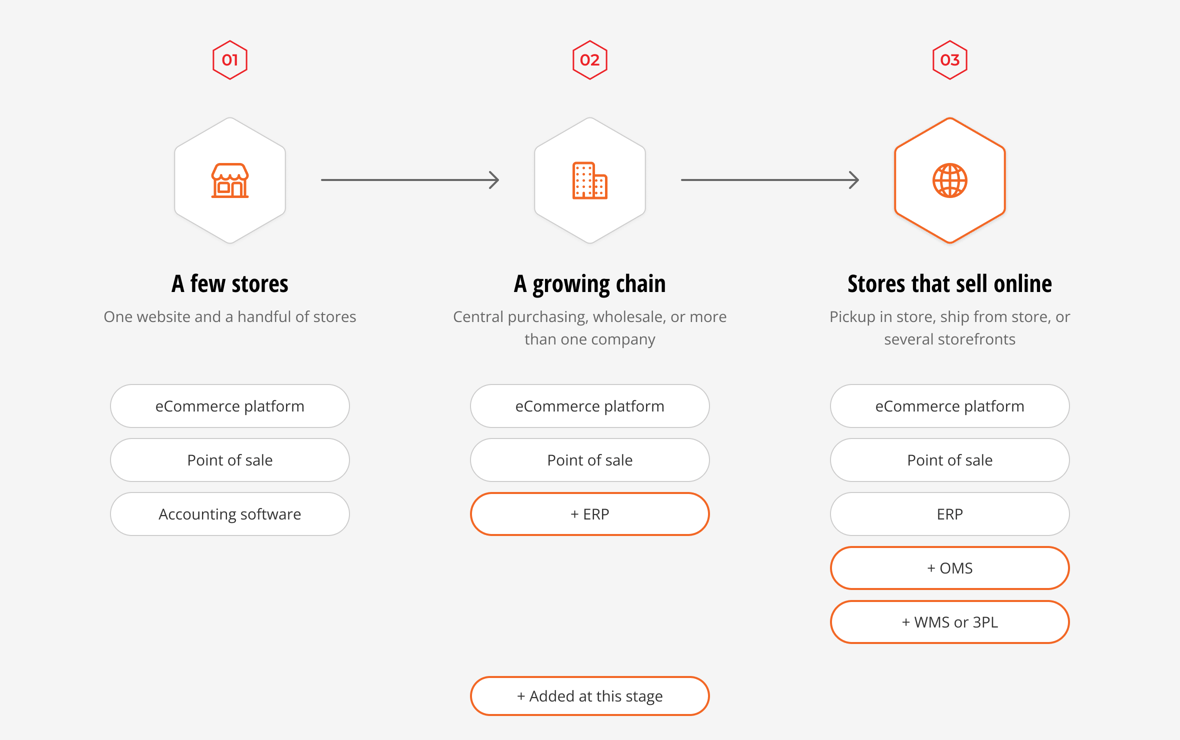
There is no single right stack. The right one depends less on revenue than on two things: how many locations hold stock, and whether your stores fill online orders. The store counts below are common patterns, not rules.
| Stage | What it looks like | Core stack | Sign you're ready for the next stage |
|---|---|---|---|
| A few stores | One website, a handful of stores, one legal entity | eCommerce platform, POS on the same platform, accounting software | Purchasing lives in spreadsheets, or you add wholesale or a second legal entity |
| A growing chain | Often 10 or more stores, central purchasing, sometimes wholesale or several entities | Add an ERP for purchasing, finance, and inventory value | Stores start filling online orders, and stock or orders need manual fixes |
| Stores that sell online | Pickup in store or ship from store, or several storefronts or countries | Add an OMS for sellable stock and order routing, and a WMS or 3PL when the warehouse grows | Each new channel, store, or country should plug into the same stack instead of needing its own integration |
A few stores. With one website and a handful of stores, Shopify's own multi-location inventory and local pickup cover most needs, and accounting software handles the books. A store manager can fix a count by phone. Adding systems here mostly adds cost.
A growing chain. Somewhere past the first handful of stores, purchasing, finance, and stock value outgrow spreadsheets and basic accounting. This is where retailers add an ERP such as NetSuite, especially if they sell wholesale or run more than one company or currency. The ERP becomes the record for money and stock value.
Stores that sell online. The bigger change comes when stores start filling online orders. Now the stock in every store is part of what the website can promise, and every online order needs a decision about where to fill it. The storefront can show stock across locations, and the ERP can hold the stock record, but neither works out how much store stock is safe to sell online or which store should take each order. This is the stage where retailers add an OMS. This is also when store teams need simple tools for fulfillment, receiving, and counts, so they aren't working in ERP screens. Our store inventory management guide covers that store-side work step by step.
A retailer can reach this stage with 10 stores or with 100. A brand with eight stores that all fill online orders needs an OMS sooner than a 40-store chain whose stores only sell to walk-in shoppers.
Shopify and NetSuite show up together in many mid-market retail stacks, and for good reasons.
Retailers choose Shopify because the storefront and Shopify POS run on one platform, with one product catalog and one customer record. New storefronts and stores can go live quickly, and a large app ecosystem fills most gaps. Retailers choose NetSuite because it handles financials, purchasing, and reporting across several subsidiaries and currencies in one cloud ERP. Each does its own job well.
The two still need to talk to each other. Most retailers start with a connector, such as Celigo, that moves orders, items, customers, and stock numbers between Shopify and NetSuite. A connector does that job: it passes records from one system to the other.
The gap is in the decisions neither system makes. A connector can copy a stock number from NetSuite to Shopify, but it doesn't work out how much of a store's stock is safe to sell online after holding some back for walk-in shoppers. The connector can also pass an order to NetSuite without deciding which store or warehouse should fill that order. Cases like pickup orders, ship from store, split shipments, kit products, and gift cards tend to fall through to manual work. Our comparison of a standard Shopify NetSuite connector vs an OMS walks through those cases.
Retailers connect their stack in one of three common ways, and many use a mix:
Whichever pattern you choose, the same things have to move between systems: orders, stock changes, fulfillments, returns, refunds, and payments. Following one ship from store order shows how they fit together:
Timing matters as much as the path. Some flows run as events, the moment something happens. Others run in batches on a schedule. A delay of a few minutes on a finance record rarely hurts anyone, while the same delay on stock for a fast-selling item can sell a unit twice. When you review your stack, ask how often each flow runs and what happens when one fails, not only whether it is connected. Our engineering team explains why retail integrations need pipelines, not just API calls.
Run this list against your own business. Each sign points back to a job without a clear owner.
One or two of these are normal while a business grows. Several at once usually mean the stack needs a clear owner for stock and orders.
HotWax Commerce is an omnichannel order management system for retailers that sell through Shopify and their own stores, often with NetSuite as their ERP. Sitting between the storefront, POS, ERP, and warehouse, HotWax owns the two jobs this guide keeps coming back to: how much stock each channel can sell, and where each order should be filled.
HotWax works out sellable stock for each channel from what is on hand, minus the safety stock each store keeps for walk-in shoppers, a company-wide buffer, and units already promised to other orders. HotWax then publishes that number to Shopify. Retailers set routing rules without code, and HotWax routes each online order to the store or warehouse that should fill it. Store teams get apps for ship from store, pickup orders, receiving, cycle counts, and transfers, so they don't have to work in ERP screens.
HotWax doesn't replace the ERP, the POS, or the WMS. NetSuite stays the system of record for inventory value and finance, and the NetSuite integration is native and included at no extra cost. HotWax also integrates with Shopify and Shopify POS, and with tools like Oracle Retail Xstore, Loop, AfterShip, Klaviyo, FedEx, and UPS.
Unified Commerce Group (UCG), the company behind Frank & Oak, rolled out Shopify POS and HotWax across all 15 of its stores in four months. Leo Lo, UCG's CTO, said they wanted "a robust out-of-the-box integration with NetSuite and Shopify."
See how the pieces connect on our OMS architecture page, or download the Omnichannel Retail Tech Stack of the Decade whitepaper for the full reference architecture.
A retail tech stack gets better with clearer owners, not more tools. Every job and every number needs one owner, from the stock on each shelf to the store that fills each order.
Talk to our team about your retail tech stack.
![]()