
Headquarters
175 S Main St Suite 1310,
Salt Lake City, UT 84111



Retailers struggle with legacy order management systems because the business can no longer change them quickly, trust the inventory they sell from, or explain the decisions they make.
An order management system (OMS) can run in the cloud and handle complex sourcing logic, yet still behave like a legacy system if rule change waits for IT.
The problem tends to surface during peak planning. An eCommerce team decides that for Black Friday, one box per order matters more than speed, to keep shipping cost down. Changing the sourcing rule then means a ticket, a business case to IT, a technical spec, and a development sprint. The change often lands after the season it was meant for.
A legacy order management system is one the business has outgrown but cannot easily change. Its routing rules can only be edited by IT or the vendor, and its inventory updates in batches. Stores are added on after the fact, and each team sees a different version of the same order.
The classic example is an on-premise monolith customized until every upgrade becomes risky. Cloud order management systems end up there too when their rules live in code only the vendor can touch.
Retail business rules change with the calendar. A promotion, a new store, a new brand, or a holiday cutoff each calls for a different balance between delivery speed, shipping cost, and keeping inventory where it sells best. In a legacy OMS that balance lives in code or vendor configuration, so each change goes back through IT. Over time, teams stop requesting changes, and routing stays at a yes-or-no stock check plus distance.
Upgrades follow the same pattern. Custom code has to be retested with every new version, so many retailers fall behind until end of support forces a migration on the vendor's schedule. Smaller fixes wait on the vendor's roadmap, and requests that do not fit it can be declined.
Many legacy setups refresh inventory from the enterprise resource planning (ERP) system once a day, so orders are routed against stock that is almost a day old. Receiving adds its own delay, because product can reach a store before the ERP creates the receiving record, which leaves it on the shelf without being sellable online.
Phantom inventory does even more damage. When a store ships fewer units than a transfer asked for, the missing units often stay on the books as sellable. They get sold online and then rejected at pick. In a 2018 Auburn University RFID Lab study, audits of shipments tracked without item-level RFID found order inaccuracy 69% of the time.
IHL Group puts the global cost of inventory distortion, meaning out-of-stocks plus overstocks, at about $1.7 trillion a year.
Because the ERP is the financial record, many retailers on a legacy ERP also treat it as the source of truth for what can be sold. The ERP rarely sees every store sale, reservation, and in-flight online order as it happens, so it cannot tell the website what is available right now.
In a cleaner split, the ERP keeps financial on-hand, cost, and shrink. The OMS owns available to promise (ATP), the sellable quantity after reservations and buffers, and decides where each order ships. Legacy setups blur this line, which leads to one of two bad outcomes. Either a store rejection changes nothing and the missing unit keeps selling, or a rushed rejection on the sales floor writes straight into the count finance relies on.
Most legacy order management systems were built to ship from a warehouse, and stores were connected later with the same yes-or-no stock check. That check breaks down in footwear and apparel, where a store often holds one unit per size. That unit may be a worn display item an online customer will not accept. The store rejects it, and the system cancels the order or splits it across boxes, even when another store could ship everything in one. Shoppers notice: 22% of US online adults told Forrester they frequently had orders canceled by the retailer.
Associates often pick from printed lists and sort orders by hand, with no scan to catch a wrong item. Multi-box shipments are not tracked by item, so when a box goes missing, nobody knows what was inside. When a store printer fails, there is often no quick way to take that store out of rotation, so its orders wait or get canceled.
When order management grew channel by channel, stores and the website often ended up on separate systems. Lowe's showed investors that in 2018 its store and Lowes.com order management ran separately, so associates would see different information about items, inventory, delivery, customers, and orders. Customer service feels this first. Once an order is released to a location, even a corrected address can need a workaround outside the system.
Every one of these weaknesses grows with order volume. More orders are routed against stale stock, rejections pile up faster than people can reroute them by hand, and routing slows as the queue grows. Getting an older on-premise OMS ready for peak is often a project of its own, with load tests, data purges, and database tuning. Peak is also when operations ask why an order went to a particular store, and in a legacy system that answer usually needs a ticket.
Most retailers first try to work around a legacy OMS. They add a connector to sync one system, a script to handle one edge case, and a separate tool for shipping labels. Each fix solves one problem but adds one more system with its own inventory count, and when those counts disagree, nobody knows which one is right.
Other retailers go the opposite way and move everything to a new OMS at once. Every store, channel, and integration then changes on the same day, so if something breaks, it breaks everywhere. Few teams want that risk, and fewer still want to connect a new OMS to a point-of-sale (POS) system they plan to retire within months.
A phased move avoids both problems. The retailer starts with one brand, one region, or a small group of stores, while the ERP keeps sending inventory the way it does today. More stores and brands join in waves, timed around the POS rollout, and inventory availability and routing move into the new OMS one step at a time. New rules are tested against real orders well before peak, so the team sees the result before customers do.
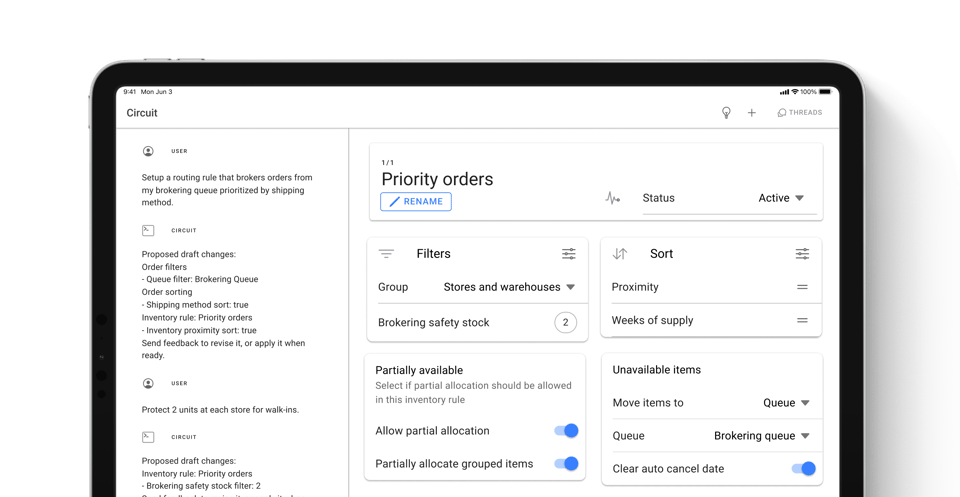
HotWax Commerce hands control of the rules back to the operations team. The team sets its intent once in the Order Routing App without code, such as a peak batch that prefers fewer packages and splits only as a last resort. The engine then applies it to every order and reroutes rejected items automatically. Before a change goes live, Routing Simulation compares it with the current rules across copied or queued orders without touching live orders.
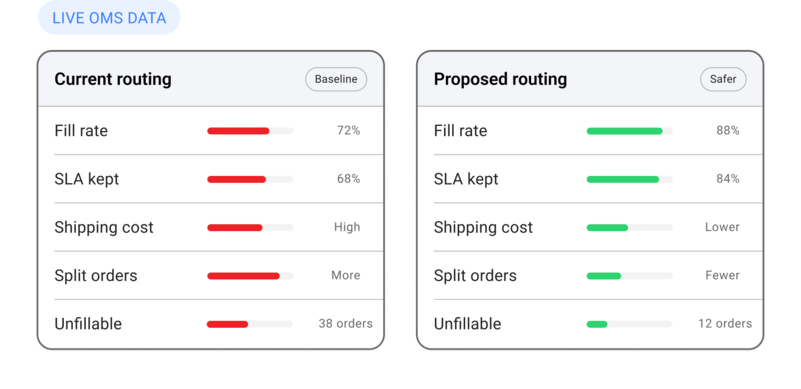
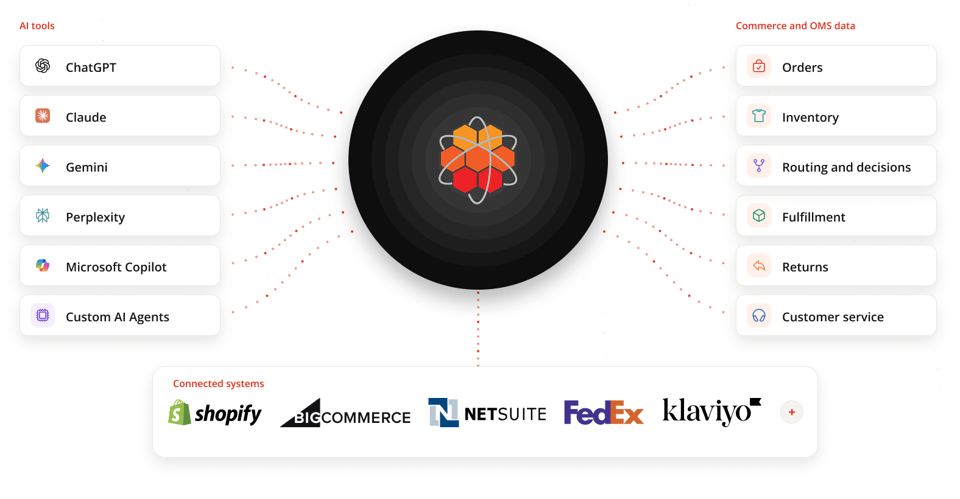
On inventory, HotWax pulls stock from the ERP, POS, and warehouse management system into one pool and calculates one Online ATP per channel. That number already allows for safety stock for walk-in shoppers, a company-wide threshold, and orders waiting to be routed. Systems without APIs can still feed it through CSV or SFTP. The ERP stays the financial record, with a native NetSuite integration and support for other ERPs. Configurable rejection reasons decide whether a store rejection reduces only online availability or the on-hand count as well.
In stores, associates work from the Fulfillment App and Picking App, with picklists, built-in scanning, and labels booked in advance through rate shopping. When an associate rejects an item with a reason such as Damaged or Worn Display, HotWax reroutes it to the next best location. A store manager can also pause a store by setting its capacity to none. Customer service works from the Order Manager App, with each order's timeline, holds, and bad-address handling in one place.
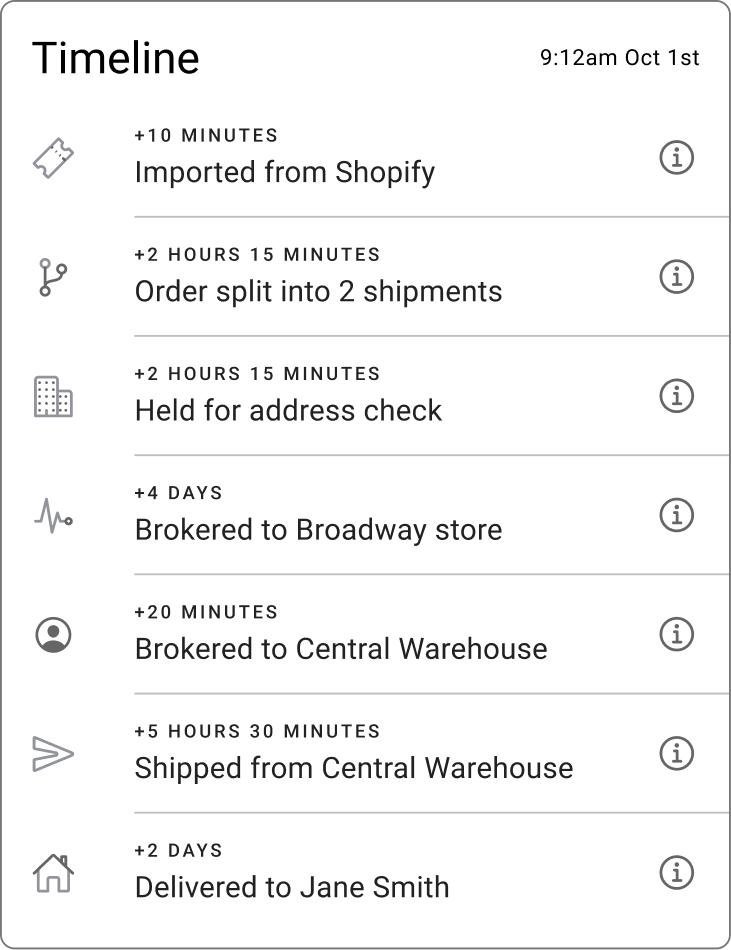
Retailers have implemented HotWax at scale. Steve Madden, whose legacy OMS routing could take hours during seasonal peaks, now runs buy online, pick up in store and Ship From Store on HotWax and jewelry brand gorjana went live across more than 90 stores in four months.
An OMS becomes legacy when the business cannot change its rules quickly, trust its inventory, or explain its decisions, whatever its age.
Batch updates, receiving delays, and phantom units make legacy inventory unreliable, and the cost shows up as store rejections and canceled orders.
Each system needs one job: the ERP keeps the financial record, and the OMS is available to promise and routing.
Stores and customer service need one shared view of each order, plus routing that protects thin size runs with store safety stock.
Replace a legacy OMS in phases, starting with one brand or channel and testing rules well before peak.
* * *
If every routing change still starts with an IT ticket, talk to HotWax Commerce about a phased move. It can begin with one brand or channel and keep your ERP as the financial record.




175 S Main St Suite 1310,
Salt Lake City, UT 84111